“Gemini AI” was the single most-searched term in the Philippines in Google’s 2025 Year in Search — beating celebrities, typhoons, and election news. Filipinos are asking ChatGPT to write their reports, asking Gemini to summarize PDFs, and asking Copilot to draft their emails, all day, every day. And a question we keep getting in our TikTok Shop comments is some version of: “Kaya ba ng laptop na ito ang AI? Kailangan ko ba ng mas mataas na spec?”
Short answer: probably not. Here’s the honest, no-sales-pitch breakdown of what you actually need.
The honest answer: no, you don’t need an expensive laptop for ChatGPT or Gemini
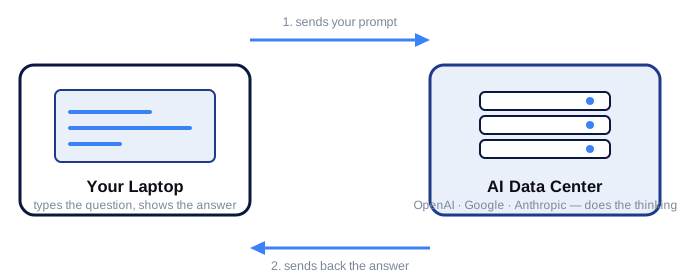
Your laptop’s only job is steps 1 and 2 — typing and reading. The actual “thinking” happens on someone else’s server.
Here’s the part almost nobody selling laptops wants to tell you: ChatGPT, Gemini, Claude, and the web version of Copilot don’t run on your laptop at all. When you type a prompt, it travels over the internet to a massive data center owned by OpenAI, Google, or Anthropic. That data center — not your laptop — does all the heavy computing. Your laptop’s only job is to display a webpage and send your typed text.
This means the AI model doesn’t care if your laptop has an Intel Celeron or a Core i9. It doesn’t care if you have a graphics card. It doesn’t even really care how much RAM you have, as long as your browser can load the page. The “brain” of the AI is not sitting inside your machine.
So if your plan is to open chatgpt.com, gemini.google.com, or the ChatGPT/Gemini app and chat with it — for schoolwork, emails, content ideas, coding help, or just curiosity — practically any laptop sold in the Philippines today, including our cheapest model, handles it without breaking a sweat.
So why do some laptops feel slow when using AI tools?
If the AI itself doesn’t strain your laptop, why do some people complain that “ChatGPT lags” on their machine? It’s almost never the AI — it’s everything else running at the same time. A few real culprits:
- Too many Chrome tabs open. AI chat + 15 other tabs + Messenger + a YouTube video in the background eats RAM fast. On a laptop with only 4 GB RAM, this causes real slowdowns.
- An old or underpowered CPU. A laptop from 2015 with an old dual-core Celeron will feel sluggish loading any modern website, AI or not — the web itself has gotten heavier.
- Too many browser extensions. Grammarly, ad blockers, VPNs, and AI “sidebar” extensions all run in the background and compete for the same RAM as your AI chat tab.
- Weak or shared WiFi. AI responses stream in real time — a bad connection makes it look “slow” even though your laptop is fine.
Notice none of these are about the AI needing a powerful processor. They’re about ordinary multitasking — the same thing that would slow down any laptop, AI or not.
The one spec that actually matters: RAM
If there’s a single number to pay attention to, it’s RAM — not for the AI model, but for keeping your browser stable while the AI tab sits open next to everything else you’re doing.
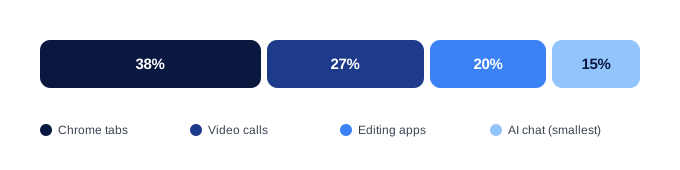
In a typical multitasking session, the AI chat tab is usually the smallest thing competing for your RAM — not the biggest.
| Your situation | RAM you need | Why |
|---|---|---|
| Just chat with ChatGPT/Gemini occasionally, few tabs open | 8 GB | Plenty of headroom for a browser and normal use |
| Student: AI chat + Google Docs + research tabs + Canva | 8 GB | Comfortable for typical school workload |
| VA / freelancer: AI chat + 20+ client tabs + Zoom + email all day | 16 GB | 8 GB gets tight fast with this much multitasking |
| Content creator: AI chat + CapCut + multiple browser windows + file uploads | 16 GB | Editing apps are RAM-hungry on their own |
| Running AI models locally (Ollama, Stable Diffusion, LM Studio) | 16 GB+, dedicated GPU recommended | This is the only case where you’re actually asking the laptop to do the AI’s job |
That last row is the real exception. If you specifically want to run an AI model on your own laptop instead of through a website — no internet needed, full privacy, tools like Ollama or local Stable Diffusion — that genuinely requires serious RAM and ideally a graphics card. But that’s a hobbyist/technical use case, not what 99% of Filipino students, VAs, and TikTok Shop sellers are doing when they say they “use AI.”
Do you need a “Copilot+ PC” or NPU chip?
You’ve probably seen laptops marketed as “Copilot+ PC” or advertising an “NPU for AI.” Here’s what that actually means: an NPU (Neural Processing Unit) lets certain Windows features — like Recall or on-device image generation — run without an internet connection, processed locally instead of in the cloud.
If you’re perfectly happy using ChatGPT, Gemini, or Copilot through your browser (which is what almost everyone actually does), you get the same writing help, research help, and image generation without paying the Copilot+ PC premium. You’re paying extra for offline capability most people never use. Skip it unless you specifically need AI features to work with zero internet.
Our picks: what to actually buy for AI-assisted work
All three of our models handle browser-based ChatGPT and Gemini use without issue — the difference is how much else you’re running alongside it.
WK AuraBook 15.6 — from ₱11,999
If your AI use is: ask ChatGPT to explain a topic, ask Gemini to summarize a reading, draft an email, get help with a caption — occasional, single-task use — the AuraBook’s Intel Celeron and 8 or 12 GB RAM is genuinely enough. You’re just loading a webpage. Don’t pay more for AI use cases you won’t hit.
WK Core i3 — from ₱13,442
The sweet spot for VAs, freelancers, and students who keep an AI chat tab open while running Zoom, 15+ Chrome tabs, Canva, and light editing at the same time. Get the 16 GB RAM option here — that’s the upgrade that actually prevents slowdowns during heavy multitasking, not a faster chip.
WK N95 — from ₱16,998
Same recommendation as the Core i3 for AI multitasking, plus you get AutoCAD 2D support if you need it for school or drafting work. If you don’t need AutoCAD, the Core i3 with 16 GB does the identical job for AI-assisted work at a lower price.
🛒 All three ship with Windows 11 pre-activated and MS Office lifetime — nationwide COD, PayLater/BillEase, 1-year Makati warranty. See the full spec comparison in our budget laptop guide →
Real-world scenarios
Kim, BSBA student in Davao. Uses Gemini to summarize case studies and ChatGPT to check her grammar before submitting papers, alongside Google Docs and 5-6 research tabs. Choice: WK AuraBook 15.6, 8 GB RAM. Her AI use is light and sequential — she’s never running more than a handful of tabs at once.
Rico, virtual assistant handling 3 international clients from Iloilo. Keeps ChatGPT open in one tab to draft client replies while juggling Gmail, Slack, a shared spreadsheet, Canva for social posts, and Zoom calls — often all at the same time. Choice: WK Core i3, 16 GB RAM. The 8 GB option would choke under that many simultaneous apps; the extra RAM is what keeps everything responsive.
Anna, TikTok Shop seller in Cavite. Uses ChatGPT to write product descriptions and generate caption ideas, plus CapCut for reel editing and her shop’s seller dashboard open all day. Choice: WK Core i3, 16 GB RAM. Editing apps plus AI chat plus a live dashboard is enough concurrent load to justify the RAM upgrade.
Julius, engineering student in Baguio. Uses Gemini to double-check formulas, plus AutoCAD 2D for drafting assignments. Choice: WK N95, 16 GB RAM. He needs the N95 specifically for AutoCAD — the AI use on top of that is a non-issue once he has the RAM for multitasking.
Common myths, debunked
- “More RAM makes the AI smarter or faster at thinking.” False. The AI’s “thinking” happens entirely on the company’s servers. Your RAM only affects how smoothly your browser and other apps run alongside it.
- “You need a graphics card (GPU) to use ChatGPT or Gemini.” False, for the web versions. A GPU only matters if you’re generating AI images or video locally on your own machine — not through a website.
- “Older laptops can’t run AI tools at all.” Mostly false. If the laptop can load a modern website reasonably fast, it can use ChatGPT or Gemini. The exception is laptops so old they can’t run an up-to-date browser securely.
- “AI apps need more storage space.” False for cloud AI — there’s no large model file sitting on your drive. You’d only need serious storage for locally-downloaded AI models, again a niche technical case.
Bottom line
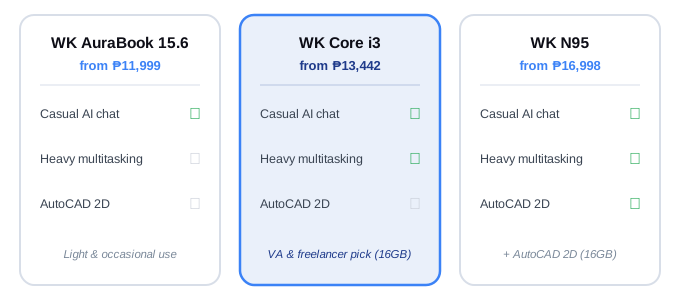
All three handle casual AI chat. The 16 GB Core i3 and N95 add headroom for heavy multitasking; only the N95 adds AutoCAD 2D.
For the overwhelming majority of Filipinos using AI tools in 2026 — students researching with Gemini, VAs drafting emails with ChatGPT, sellers writing captions, anyone asking an AI a question — you do not need to spend more on a laptop because of AI. The AI runs in the cloud. What determines your experience is the same thing that’s always mattered: enough RAM to multitask without freezing, and a browser that isn’t five years out of date.
- Occasional AI chat, light multitasking → WK AuraBook 15.6 (from ₱11,999, 8 or 12 GB RAM)
- AI chat running alongside heavy multitasking (VA, freelance, content work) → WK Core i3 with 16 GB RAM (from ₱13,442)
- Same as Core i3, plus you need AutoCAD 2D → WK N95 with 16 GB RAM (from ₱16,998)
Don’t let anyone sell you a “Copilot+ PC” or an AI-branded premium laptop for tasks a ₱13,000 machine already does through a browser.
🛒 Where to Buy
All three models ship from our TikTok Shop with nationwide COD, PayLater / BillEase installments, and 1-year local warranty.
- 👉 Buy WK AuraBook 15.6 — from ₱11,999 — light office & occasional AI chat
- 👉 Buy WK Core i3 — from ₱13,442 — AI + heavy multitasking, the VA/freelancer pick
- 👉 Buy WK N95 — from ₱16,998 — same as Core i3, plus AutoCAD 2D
Or browse all models on our TikTok profile →. For more on picking the right model for your workload, see our full budget laptop buying guide or read Is WK Laptop Good? An Honest Review.
Salamat for reading — see you on TikTok.
— The WK Editorial Team